Ready-to-use business phone system

A ready-to-use phone system for your business.

Your own business number with a professional phone menu, extensions, voicemail to email, and texting on plans that include it. Set up online in minutes, with no hardware to install.

  • No hardware to install
  • Apps for Android and Windows
  • Most businesses are live within an hour
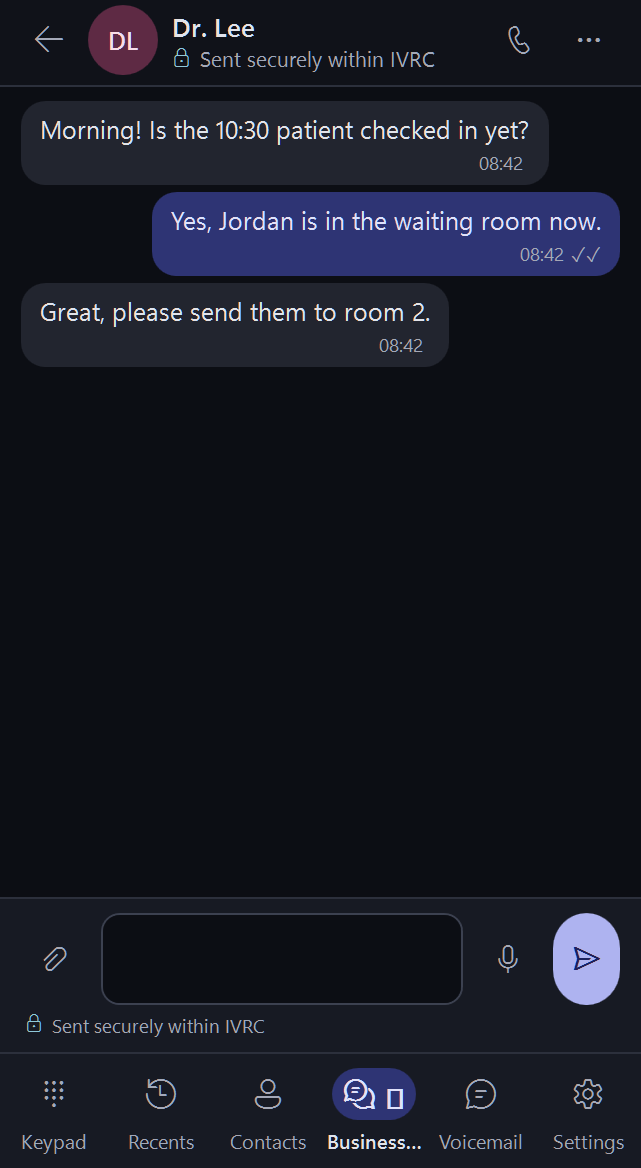
The Windows app: secure Business Chat
Windows app
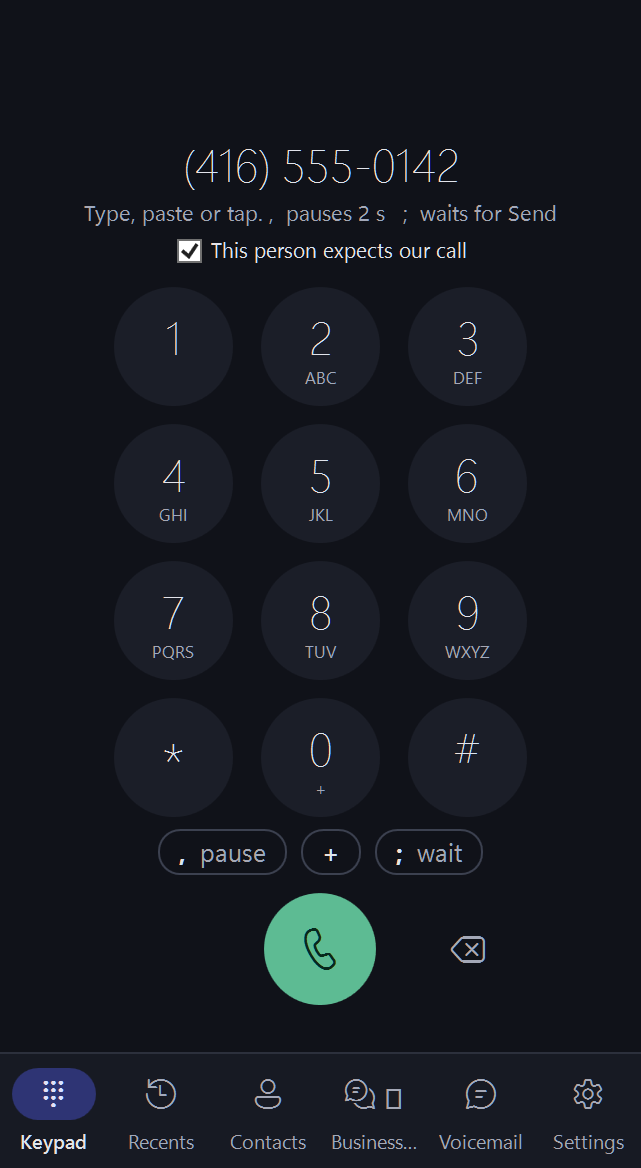
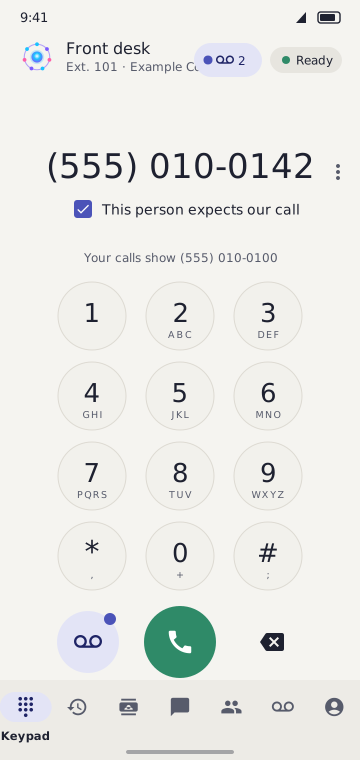
The Android app: the keypad with the "This person expects our call" tick
Android app

Questions, answered

Plain answers, from your first question to running your business on IVRC.

Between two people

For you and the people you work with, calling and messaging each other and the outside world.

What is IVRC?

IVRC is a phone system that runs over the internet. Each person gets an extension that rings in the app, on a desk phone, or on their own mobile. You can call and message each other, and call or text people outside. Everyone shares one business number for the outside world.

Do I need special equipment?

No. You can use the app on your computer or phone, a desk phone, or have calls forwarded to the mobile you already carry. Most people are set up within an hour of paying.

What is an extension?

An extension is a short internal number for one person, such as 101. Colleagues dial it to reach that person directly. Calls to the business number can also be sent to it from the phone menu. The number of extensions depends on your plan.

Are calls between us free?

Yes. Calls between extensions on your account are not billed. They also don't count toward the number of outside calls you can have at once.

Can I use IVRC on more than one device?

Yes. An extension can ring your phones and apps together, so you answer wherever you are. There are apps for Android and Windows. An iPhone app is coming.

Can we chat and send files to each other?

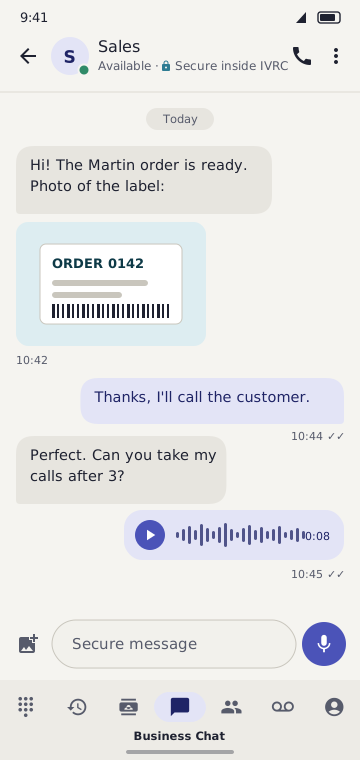
Yes. Secure chat between extensions is included and not billed per message. To keep it fair, one person can send up to 10 messages a minute. Pictures can be up to 10 MB, files up to 25 MB, and voice notes or videos up to 50 MB.

How much chat storage do we get, and what if it fills up?

Storage depends on your plan and is shown on the Pricing page. Nothing is ever deleted automatically. When storage is full, new uploads wait until you delete old files or upgrade. Admins get an email and a notice when storage is nearly full.

Who sees my calls and messages?

Your account is private to your business. Chat, calls and voicemail are kept Secure and are only visible to the people your business gives access to.

For your business

Numbers, phone menu, texting, billing and the rest of the business phone system.

Can I choose my number before I pay?

Yes. On the Get started page you search for a local number and pick one. Each search shows up to 5 numbers, and you get a limited number of searches. Your chosen number is held for 15 minutes while you finish signing up.

Can I keep my existing number?

In most regions, yes. You can move a mobile, landline or internet number to IVRC. Contact us after you sign up and we will guide you through it.

What will people see when we call them?

Outside calls show your business number, so customers see one number for the whole team.

How many calls can we have at once?

As many outside calls at once as you have extensions. Calls between your own extensions don't count toward it.

Can I set up a phone menu and business hours?

Yes. Callers hear your greeting and press a key to reach sales, support or a person. You set your opening hours and holidays, and an after-hours message plays when you're closed. The Pricing page shows which plans include the phone menu.

Which languages can callers hear?

Every plan offers English and French greetings and menus. Higher plans add Urdu.

How does voicemail work?

When nobody answers, the caller can leave a message. Each message is emailed to you so you can listen right away.

Can we call numbers in Canada and the US?

Yes. Every plan includes a monthly bundle of Canada and US minutes, shown on the Pricing page. The bundle resets on your billing date, and unused minutes don't roll over. After the bundle, each minute is billed at the rate on the calling rates page, rounded up to the whole minute per call.

Can we call other countries?

Yes, on plans that include international calling, or with the International calling add-on. Per-minute rates for each country are on the calling rates page. Calls are billed the same way, by the minute, on your monthly invoice.

What happens when we use more minutes than our plan includes?

Your calls keep working. Extra minutes are billed per minute at the listed rate. They appear on your next monthly invoice, grouped by country, with the minutes and the total.

Can we text our customers?

Yes, on plans that include business texting. Texting works in Canada now, and US texting is coming. You can send and receive pictures as well as words. Customers must agree to get your texts, and anyone who replies STOP is removed at once.

What is the text before the first call?

Before your business calls someone for the first time, IVRC can text them a short heads-up with your contact card, so they know it's you. It only goes to people who texted you before, or whom your staff marked as "This person expects our call". You can switch it off for the whole business or for one phone.

When am I billed?

Your billing date is the day you subscribe, and you're billed on that date each month. Upgrades, add-ons and extra numbers added mid-month are prorated on your invoice. Each invoice lists your plan, add-ons, and call minutes with their totals.

Can I change plans later?

Yes. Upgrade or downgrade from your billing page at any time. Your settings and messages are kept. If you move to a plan with fewer extensions, the extra ones keep working for 14 days, then the newest are paused, not deleted.

Can I call 911?

IVRC is an internet-based business phone system, not a traditional telephone service. Emergency (911) calling is severely restricted and may not work during power, internet or service outages, or if your address isn't registered. Always keep another way to call 911, such as a mobile phone.

How do I cancel?

You can cancel at any time from your billing page. Your service continues until the end of the period you've paid for. Fees already paid are not refunded unless the law requires it. Download anything you want to keep before your account is closed.

How do I get help?

Use the Contact page to reach our support team by email. Tell us your business name and what you need, and we'll reply as soon as we can.

Still have a question? Contact us.

Android and Windows apps

Your business phone in your pocket and on your desk

Every extension works in the Android phone app and the Windows desktop app, together with desk phones and mobile forwarding. Calls, chat, texts and voicemail in one place, on several devices at once.

Android app

Android app: keypad
Android app: secure chat with a picture and a voice note
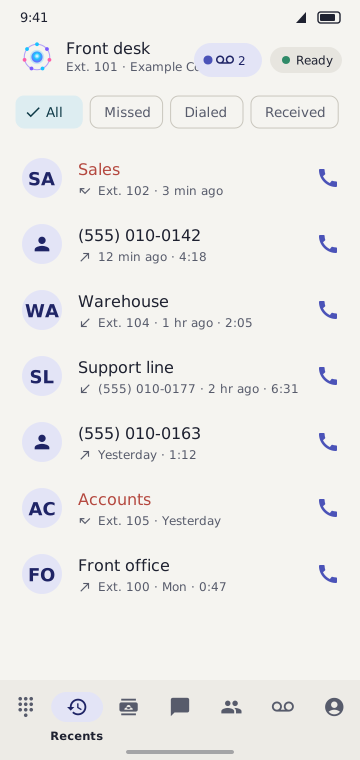
Android app: recent calls

Windows app

Windows app: keypad
Windows app: secure Business Chat
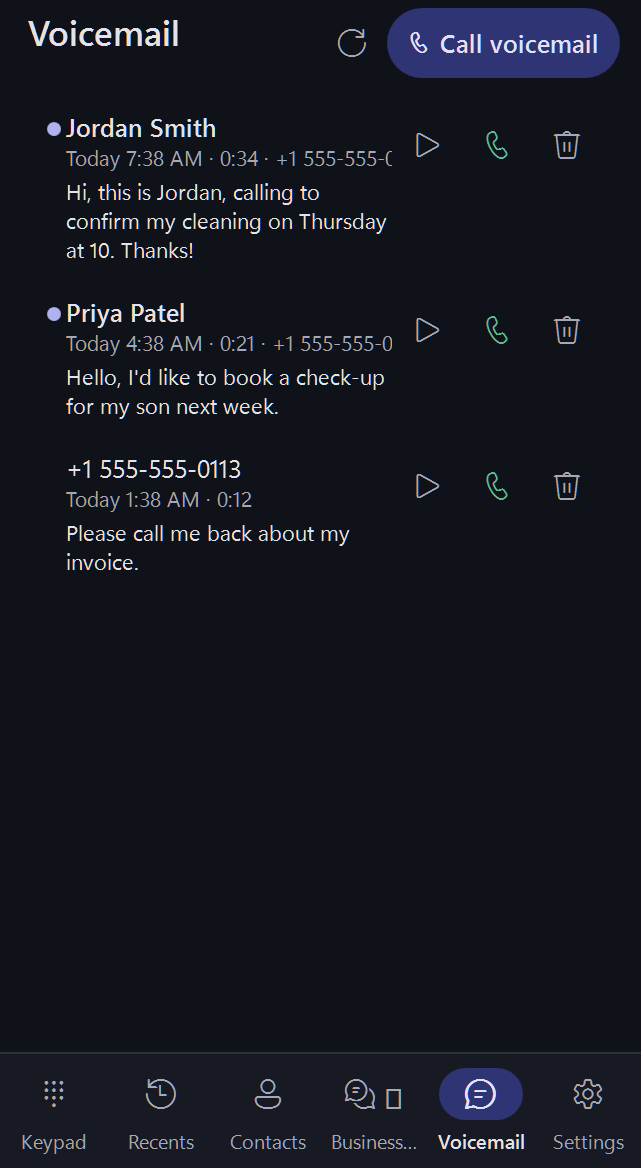
Windows app: voicemail

Get the apps

Your team gets the apps when your account is set up. iPhone app coming soon.

Lots of free tools included

No per-use charge for any of these. Items marked "on plans that include it" come with the plans that list them.

  • Secure team chat Messages, pictures, files and voice notes between every extension.
  • Free calls between extensions Call any colleague's extension, from any app or desk phone.
  • Voicemail to email Each message e-mailed with the recording and a written version.
  • Business hours and holidays Calls are answered your way when you are open, closed or away.
  • Call history Missed, dialed and received calls, with one-tap call back.
  • Contacts Your team and customers by name, in every app.
  • Apps on several devices Android phone, Windows computer and desk phones ring together.
  • "Hang up my other call" Start a new call and choose to end or keep the one you are on.
  • Your extension page Your own extension page in any web browser.
  • Call transfer and hold Pass a caller to a colleague, or put them on hold. On plans that include it
  • Phone menu "Press 1 for sales" with greetings in several languages. On plans that include it
  • Ring groups Ring several people at once for one department. On plans that include it
  • Call recording Record calls your team answers and play them back later. On plans that include it

Built for how your team really works

Secure chat between everyone in your business

Messages, pictures and files between every extension, included free with every account.

Fair use: up to 10 messages a minute per person; pictures up to 10 MB, files up to 25 MB, voice notes and videos up to 50 MB.

Texting from your business number

Send and receive text and picture messages (SMS and MMS) with your customers, two-way, from the number they already know. You can also send texts to customers in many other countries.

Two-way texting on Canadian numbers. US texting coming soon. On plans that include business texting; customers must agree to get your texts.

A heads-up text before your first call

Before you call someone for the first time, they can get a short text with your contact card, so they know it is you and pick up.

Only to people who texted you before or whom your staff marked as expecting your call. You can switch it off.

Calling worldwide

Call Canada and the US from your monthly minutes, and other countries at the per-minute rates on the calling rates page.

Other countries on plans that include international calling, or with the International calling add-on.
What you get, ready to use

A complete phone system for a serious small business. No hardware to buy, nothing to install on site.

A professional menu greeting

Callers hear your greeting and press a key for sales, support or a person, instead of a ringing phone nobody answers. The Pricing page shows which plans include it.

Extensions on mobile and desktop

Each person gets an extension that rings in the Android or Windows app, on a desk phone, or on their own mobile.

Voicemail to email

When nobody answers, callers leave a message and it is emailed to you so you can listen right away.

Business hours and holidays

Set your opening hours and holidays. An after-hours message plays when you are closed.

Your own business number

Choose a local number before you pay. It is the one number your customers call, and it stays yours.

A simple monthly price

A clear monthly plan price, with what each plan includes shown up front on the Pricing page. Cancel any time.

Get started See pricing

Every call finds the right person

Callers hear your menu, pick a department or a person, and reach a desk phone, a mobile or voicemail. You decide the path.

How a call moves through your phone system An incoming call reaches your business number, hears the phone menu, is routed to a department, rings an employee's desk phone or mobile, and falls back to voicemail if nobody answers. Incoming call Phone menu 1 · 2 · 3 Sales department Support department Desk phone extension 101 Mobile forwarded Voicemail if no answer
  1. A customer calls your business number.
  2. The menu answers in the languages you chose.
  3. They pick a department or dial a person.
  4. The right phone rings: a desk phone, an app or a mobile.
  5. Nobody free? Voicemail takes the message and alerts the team.

Everything a small business phone system should do

Business features in plain language. Pick the plan that fits and change it any time.

Automated phone menu

Callers press 1 for sales, 2 for support, or dial a name. Change the menu online whenever you like.

Employee extensions

Give every person and department an extension. Desk phones, phone apps or plain mobile phones all work.

Voicemail with online access

Every extension gets voicemail. Employees listen from their phone or online and get notified of new messages.

Multiple languages

Greet callers in the languages your customers speak and let them switch during the call.

All features

Up and running in three steps

  1. Pick a number

    Choose a plan and a local business number, then pay securely online.

  2. Set your menu

    Write your greeting, add your hours, your menu options and your people.

  3. Start taking calls

    Press Go Live. Calls to your number are answered the way you set up and reach the right person.

Get started

Simple plans, clear limits

Every plan shows exactly what is included. Upgrade when you grow.

Starter

For one person or a very small team

US$49/month

Up to two languages, one call at a time, a phone menu, voicemail and employee extensions.

  • Professional business number
  • Automated phone menu
  • Business hours routing
  • LanguagesUp to 2 languages
  • Available languagesen, fr
  • Employee extensions
  • Directory entriesUnlimited
  • Bring your existing number

Business

More languages, more lines, recording and longer retention

US$349/month

Growing teams: more languages and concurrent calls, call recording and longer retention.

  • Professional business number
  • Automated phone menu
  • Direct extension dialing
  • Business hours routing
  • LanguagesUp to 3 languages
  • Available languagesen, fr, ur
  • Choose the voice
  • Employee extensions

Enterprise

Private pricing and the highest limits

Contact us Private pricing for larger teams

Everything in Professional plus higher limits and ring groups.

  • Professional business number
  • Automated phone menu
  • Direct extension dialing
  • Business hours routing
  • LanguagesUp to 10 languages
  • Available languagesAll available languages
  • Choose the voice
  • Employee extensions

Compare all plans

Built for businesses that cannot miss a call

  • Always answering

    Your menu, extensions and voicemail keep working even when your team is out.

  • Secure payments

    Card details are handled by Stripe and never stored by us.

  • You stay in control

    Change hours, menus, people and greetings yourself, from any device, in minutes.

Ready to set up your business phone system?

Choose a plan, enter your business details and pay securely. Your phone system starts setting itself up straight away.

Get started